Spinal Alignment Awareness
The natural curve of your spine changes when seated. A chair with adequate lumbar support and proper seat depth helps maintain a more neutral seated posture during focused tasks.
Understanding how your body interacts with your workspace is the first step toward sustainable work habits. The information here is general in nature and intended for educational reference.
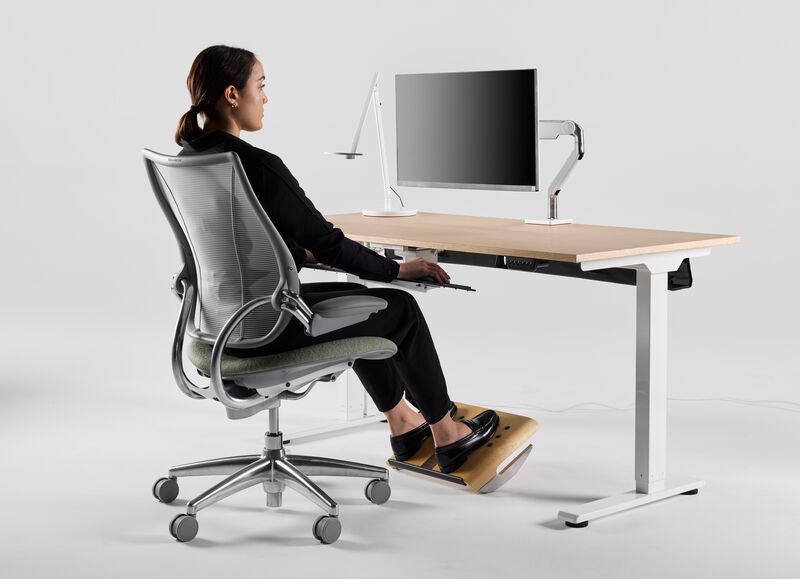
Extended periods at a desk involve sustained muscle engagement, joint positioning, and visual focus. Recognizing these patterns helps you make informed adjustments throughout your workday.
The natural curve of your spine changes when seated. A chair with adequate lumbar support and proper seat depth helps maintain a more neutral seated posture during focused tasks.
Shoulders, elbows, and wrists work together during typing and mouse use. Keeping elbows near your body at roughly a 90-degree angle reduces unnecessary reaching during daily tasks.
When seated, your desk surface should allow forearms to rest parallel to the floor with relaxed shoulders. For most adults, this translates to a surface height between 28 and 30 inches, though individual preference and chair height play a role.
Adjust chair height first, then evaluate whether your desk surface aligns with your forearm position.
Position the top edge of the screen at or slightly below eye level when sitting upright. Distance should allow you to read text clearly without leaning forward — typically an arm's length away.
Place primary and secondary screens at equal height with a slight inward angle. Center your body between both screens when usage is balanced.
Built-in screens sit too low for extended use. An external keyboard and raised laptop stand create a more sustainable configuration.
Position monitors perpendicular to windows when possible. Adjust brightness to match ambient light levels during extended screen viewing sessions.
Center the letter keys in front of your body. Keep wrists in a neutral, straight position rather than bent upward or downward during typing.
Place the pointing device at the same level as the keyboard, within easy reach. Avoid gripping the mouse tightly or extending your arm repeatedly throughout the day.
20-second visual rest every 20 minutes of screen work
Stand or walk for 5 minutes each hour
30-minute lunch away from your desk
Break schedules are general suggestions. Adapt timing to your workflow and organizational requirements.
Slow circular movements forward and backward to support mobility during keyboard use.
Look at a distant object for 20 seconds to give close-focus muscles a brief recovery period.
Reach arms overhead and gently side-bend to counteract prolonged seated compression.
Screen visibility depends on the relationship between screen brightness, ambient room light, and direct glare sources. A well-lit workspace reduces squinting and leaning behaviors that affect postural habits.
Turn off your monitor and observe reflections on the screen surface. Note light sources that create visible glare and consider repositioning your desk or adding blinds to manage direct sunlight.
Not necessarily. Many standard office chairs offer sufficient adjustability when configured properly. Focus on seat height, lumbar support, and armrest positioning before considering a replacement.
Neither extreme is ideal. Alternating between sitting and standing throughout the day generally supports a more balanced work posture than maintaining any single position for extended periods.
Equipment is one factor among many. Work habits, break frequency, stress levels, and individual physical characteristics all contribute to how you feel during desk work. Equipment adjustments are a starting point, not a complete solution.
Feet flat, thighs parallel to floor, lumbar support contacting your lower back curve.
Forearms parallel to floor, no sharp edge pressure on wrists, adequate leg clearance.
Top of monitor at eye level, arm's length distance, minimal glare from windows or lights.
Regular position changes, hydration nearby, phone and documents within easy reach.
Our four-week program delivers one focused task each weekday — adjusting a single workstation element, practicing a movement break technique, or evaluating one environmental factor. Participants track progress through a simple journal format.
The challenge is educational in scope. It does not include clinical evaluations or personalized medical guidance.
Learn About EnrollmentOur consultants can review your specific workstation and provide a written action plan based on observed conditions and your work routine.